Within seconds, Google displays thousands or even millions of results. You might find a blog post, a YouTube video, a product page, a nearby business, or an answer to your question.
But have you ever thought about how Google knows which websites to show? Does Google visit every website whenever someone searches? Does it read every blog post? How does it decide which website deserves the first position?
The process is more interesting than you might think. Google uses automated systems to discover websites, understand their content, organize information, and display relevant results when someone performs a search.
In this article, we'll explore how Google Search works, from discovering a webpage to displaying it in search results. We'll also look at how website owners can make their content easier for Google to find and understand.
1. What Is Google Search?
Google Search is a search engine that helps people find information available across the internet.
Think about a simple example. You want to learn about digital marketing, so you open Google and search for “What is digital marketing?”
Google doesn't start searching the entire internet from the beginning at that exact moment. Instead, it searches through an enormous collection of information that it has already discovered and organized.
This collection is called the Google Search Index. You can think of it as a massive digital library. Just like a library organizes books so people can find them easily, Google organizes information from webpages and other sources to help users find relevant answers.
However, not every webpage on the internet is included in Google's index. To understand why, we first need to look at how Google discovers websites.
2. How Does Google Search Work?
Google Search works through three main stages:
- Crawling: Discovering webpages across the internet.
- Indexing: Understanding and storing information about those webpages.
- Serving search results: Finding and displaying relevant results when someone searches.
Let's understand each stage with a simple example.
3. Crawling: How Does Google Discover Websites?
Imagine that you have created a new website and published your first blog post. You might expect Google to show your article immediately after publishing it. But Google first needs to discover that the webpage exists.
This is where crawling comes in. Google uses automated software programs called web crawlers to discover publicly accessible webpages. One of Google's well-known crawlers is called Googlebot.
Googlebot visits webpages, follows links, and discovers new content. It can also revisit existing pages to check whether they have been updated.
How does Googlebot find a webpage?
There are several ways Google can discover a webpage.
- Through internal links: If your homepage links to a new blog post, Googlebot can follow that link and discover the article.
- Through external links: If another website links to your website, Google may discover your page by following that link.
- Through XML sitemaps: An XML sitemap lists important URLs on your website, such as your homepage, about page, blog, and articles.
Submitting your sitemap through Google Search Console can help Google discover your website's URLs. However, submitting a sitemap does not guarantee that Google will crawl or index every URL.
What happens when Googlebot visits a webpage?
When Googlebot accesses a webpage, it retrieves information such as:
- Page content, text, and headings
- Links
- Images and other resources
- Page metadata
- Other accessible content
Google can also render webpages to understand content that depends on JavaScript. For example, if your website uses JavaScript to display certain content, Google may need to render the page to understand what is actually visible.
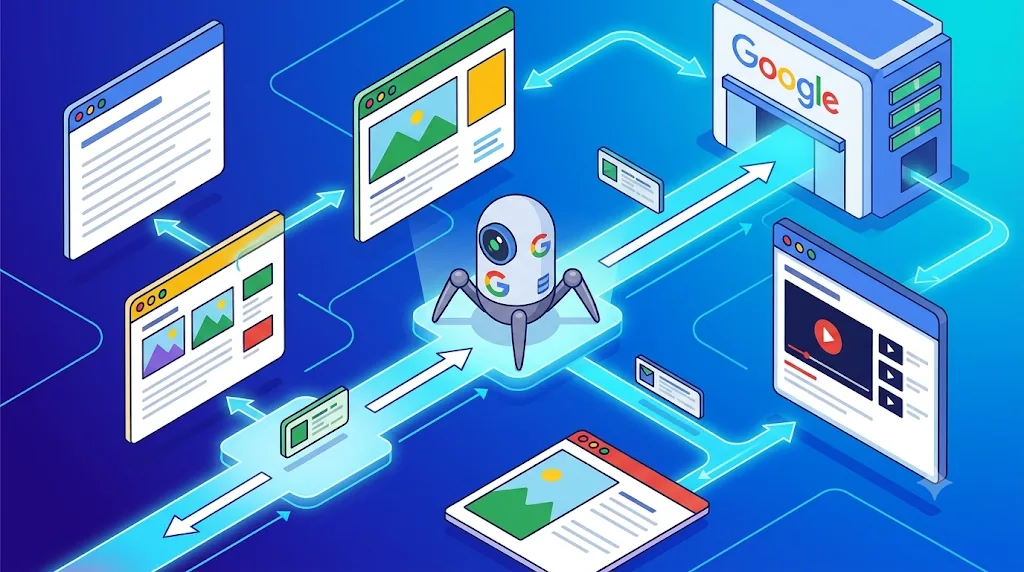
Important: Crawling does not mean your webpage has already been added to Google Search results. It simply means Google has accessed and processed the page during the crawling stage.
4. Indexing: How Does Google Understand Your Website?
Now imagine Googlebot has discovered and crawled your blog post. What happens next?
Google tries to understand what the webpage is about. This process is called indexing.
During indexing, Google analyzes different elements of the webpage, including:
- Main page content
- Page title and headings
- Images and alternative text
- Internal and external links
- Language and other information
- Duplicate or similar content
Suppose you publish an article titled “How Does Google Search Actually Work?” with sections about crawling, indexing, ranking, and search results. Google analyzes the available information to understand the subject of your webpage and how it relates to different search queries. It may then store information about the page in its Search Index.
What is the Google Search Index?
The Google Search Index is a large database containing information about webpages and other content Google has discovered and processed.
Think about how a library works. If you want to find a book about computers, you don't need to read every book in the library. You can use its catalog to locate relevant books. Google Search works in a similar way: its systems use the information organized in its index to identify potentially relevant results.
Does every crawled page get indexed?
No. A webpage can be crawled successfully but still not be indexed. For example:
- The content may provide little value.
- The page may be a duplicate of another page.
- A
noindexdirective may prevent indexing. - Google may have difficulty accessing or understanding the content.
- The page may not meet Google's indexing requirements.
Google decides which pages to include in its index. Website owners cannot force Google to index a page simply by submitting its URL.
5. Serving Search Results: How Does Google Decide What to Show?
This is the stage most people notice when using Google. Imagine someone searches for “Best digital marketing strategies for small businesses.”
Google looks through its Search Index and identifies webpages that may answer the query. It then uses automated ranking systems to determine which results are most relevant and useful.
These systems consider many signals, including:
- Meaning and intent behind the search query
- Relevance of the webpage's content
- Content quality and usefulness
- Usability and page experience
- Context such as location, language, and device
- Other signals related to the search
Google doesn't simply select the website that uses a keyword the most times. It tries to understand what the person actually wants and provide useful results.
Understanding search intent
Compare these three searches:
- “What is SEO?” The user wants to understand a concept. Informational articles and beginner guides may be relevant.
- “Best SEO tools” The user wants to compare different tools. Comparison articles and product information may be useful.
- “Buy SEO software” The user may be ready to purchase a product. Product and pricing pages may be more relevant.
Although all three searches are related to SEO, their intentions are different. This is why understanding search intent is important when creating content for your website.
6. What Is a SERP? Understanding Google Search Results
SERP stands for Search Engine Results Page. It is the page displayed after someone enters a query into Google.
For example, when you search for “digital marketing tips,” Google may display:
- Sponsored advertisements
- Organic search results
- Featured snippets
- People Also Ask questions
- Images and videos
- Local business results
The exact layout changes depending on the search query.
What are organic search results?
Organic results are unpaid listings displayed because Google's systems consider them relevant to a user's search. Website owners cannot directly pay Google to improve their organic ranking.
For example, imagine three websites appear in the first three organic positions for a particular search query. The first result is in position one, the second is in position two, and the third is in position three. These positions can influence how much visibility each website receives.
What is the difference between paid and organic results?
Paid results are advertisements that businesses run through Google Ads. Organic results are selected by Google's automated ranking systems.
A company might pay to display an advertisement for its digital marketing services. That advertisement may appear above organic listings. However, paying for Google Ads does not automatically improve the company's organic search rankings. Both are different ways of gaining visibility on Google.
7. What Is the Role of SEO in Google Search?
SEO stands for Search Engine Optimization. It involves improving your website and its content so that search engines can discover, understand, and potentially display your webpages for relevant searches.
SEO does not guarantee the first position on Google. Instead, it focuses on making your website more accessible, understandable, useful, and relevant to people searching for information.
1. Keyword research
Before writing an article, understand what people are searching for. For an article about Google Search, possible keyword ideas include:
- How Google Search works
- How Google finds websites
- Google crawling and indexing
- How Google ranks websites
Keyword research helps you understand the language people use when searching for information.
2. On-page SEO
On-page SEO involves optimizing the content and elements within your webpage. Some important elements include:
- SEO title and meta description
- H1, H2, and H3 headings
- Relevant keywords
- Internal links
- Image alt text
- Readable URLs
For example, an article about Google Search should have a clear title that accurately describes its content.
3. Technical SEO
Technical SEO focuses on improving the technical aspects of your website. Some examples include:
- Making sure important pages can be crawled
- Checking robots.txt configuration
- Using appropriate indexing directives
- Creating and submitting XML sitemaps
- Fixing broken links
- Improving website loading performance and mobile usability
- Managing duplicate URLs and canonical tags
Even useful content can struggle to appear in search results if Google cannot properly access or understand the page.
4. Quality content
One of the most important parts of SEO is creating content that genuinely helps people.
Imagine two articles covering the same topic. The first repeats the same keywords multiple times but provides very little information. The second explains the topic clearly, provides examples, answers common questions, and helps readers understand the subject. The second article offers a better experience for readers.
Instead of writing content only to satisfy search engines, focus on answering the questions your audience actually has.
Learn more in our beginner's guide to SEO, on-page SEO checklist, and keyword research guide.
8. How Can You Check Whether Google Has Indexed Your Website?
If you own a website, you don't need to guess whether Google has discovered your pages. Google provides a free tool called Google Search Console, which helps website owners monitor how their websites perform in Google Search.
URL Inspection tool
You can enter an individual webpage URL to check its indexing status. The tool can help you understand whether Google has indexed the page and identify certain crawling or indexing issues.
You can also request indexing after making changes, although this does not guarantee immediate indexing.
Page Indexing report
The Page Indexing report provides information about URLs Google knows about and their indexing status. You may see categories such as:
- Indexed
- Crawled – currently not indexed
- Discovered – currently not indexed
- Excluded by noindex
- Page with redirect
- Duplicate pages
These statuses help you investigate why certain pages aren't appearing in Google Search.
XML sitemap submission
You can submit your sitemap through Google Search Console. This helps Google discover the URLs included in your sitemap. Remember that a sitemap is a discovery aid, not an indexing guarantee.
9. Why Is My Website Not Appearing on Google?
This is a common question among new website owners. You've created a website, published several articles, and waited for Google to display them. But when you search for your website, nothing appears. There can be several reasons:
- Google hasn't discovered your website yet. Your website may be new, and Google may not have found its pages.
- Your website has crawling problems. Server errors, network problems, or incorrect robots.txt rules can prevent Googlebot from accessing your pages.
- Your pages are not indexed. Google may have crawled your pages but decided not to include them in its index.
- Your website has indexing restrictions. A noindex directive can prevent a page from being indexed.
- Your content is not relevant to the search. Even an indexed webpage may not appear for every keyword. Its relevance to the user's query matters.
How to check your website on Google
You can use Google's site search operator. For example:
site:example.com
Replace example.com with your actual domain. Google may display pages from your website that are included in its index. For more detailed information, use Google Search Console's URL Inspection and Page Indexing reports.
10. Does Google Rank Websites Immediately After Publishing?
No. Publishing a new article doesn't mean it will immediately appear at the top of Google.
First, Google needs to discover and crawl the page. It may then process and index it. After that, the page may appear for relevant searches, depending on Google's ranking systems.
Even after indexing, your article may appear on page one, page five, or much further down. There is no fixed time for indexing or ranking improvements.
This is why SEO requires regular monitoring, content improvements, and patience.
11. Final Thoughts
Google Search may look simple from the user's perspective, but several complex processes happen behind the scenes.
Whenever someone searches for information, Google uses its existing index and automated ranking systems to find and display relevant results. Understanding the three stages—crawling, indexing, and serving search results—gives you a strong foundation for learning SEO.
If you're planning to build a website or publish blog articles, remember that your first goal should be to make your content accessible and genuinely useful to readers.
You cannot control exactly when Google crawls your website or where your pages will rank. But you can improve your website, publish helpful information, organize your content, and monitor your progress through Google Search Console.
That's a much better starting point than trying to find shortcuts to the first position.
Frequently Asked Questions
1. How does Google find new websites?
Google discovers new websites through links from other webpages, XML sitemaps, and other discovery methods. Its automated crawler, Googlebot, visits publicly accessible pages and may follow links to discover additional content.
2. What is Googlebot?
Googlebot is the name used for Google's web crawler. It accesses webpages, retrieves information, and helps Google discover and process website content.
3. What is the difference between crawling and indexing?
Crawling means Google accesses and retrieves information from a webpage. Indexing means Google analyzes the information and may store it in its Search Index. A crawled page is not necessarily indexed.
4. How long does Google take to index a new webpage?
There is no guaranteed indexing time. It can take days or longer, depending on several factors. Submitting a URL through Google Search Console does not guarantee indexing.
5. Can I pay Google to rank my website first?
No. Google does not accept payment to improve organic search rankings. You can pay to run Google Ads, but advertising and organic rankings are separate.
6. What is the Google Search Index?
It is Google's organized collection of information about webpages and other content that its systems have discovered and processed.
7. Does Google use keywords to rank websites?
Google uses the words in a search query and analyzes webpage content to understand relevance. However, ranking involves many different signals, not just keyword usage.
8. What tool can I use to check website indexing?
Google Search Console is a free tool that provides indexing reports, URL inspection, sitemap submission, and search performance information.